You've probably been let down by indicators before: ones that lag the higher timeframe, repaint, clutter the chart, or only work on the timeframe they were curve-fit to. Trade Symbiotic was built to answer every one of those doubts. Here's each feature, exactly how it works, and why it earns its place on your chart.
Trade Symbiotic is an invite-only TradingView indicator published by TradeSymbiotic, a company registered in the Netherlands (KvK 90052471). The script is publicly listed on TradingView, so you can confirm it exists before you deal with us, and every feature below is documented in full before you pay anything.
Still choosing? Read what to look for in a multi-timeframe indicator, how to test whether an indicator repaints, how to combine indicators into one TradingView alert, and the alternatives, with what each one charges.
See the whole trend, not one slice of it.
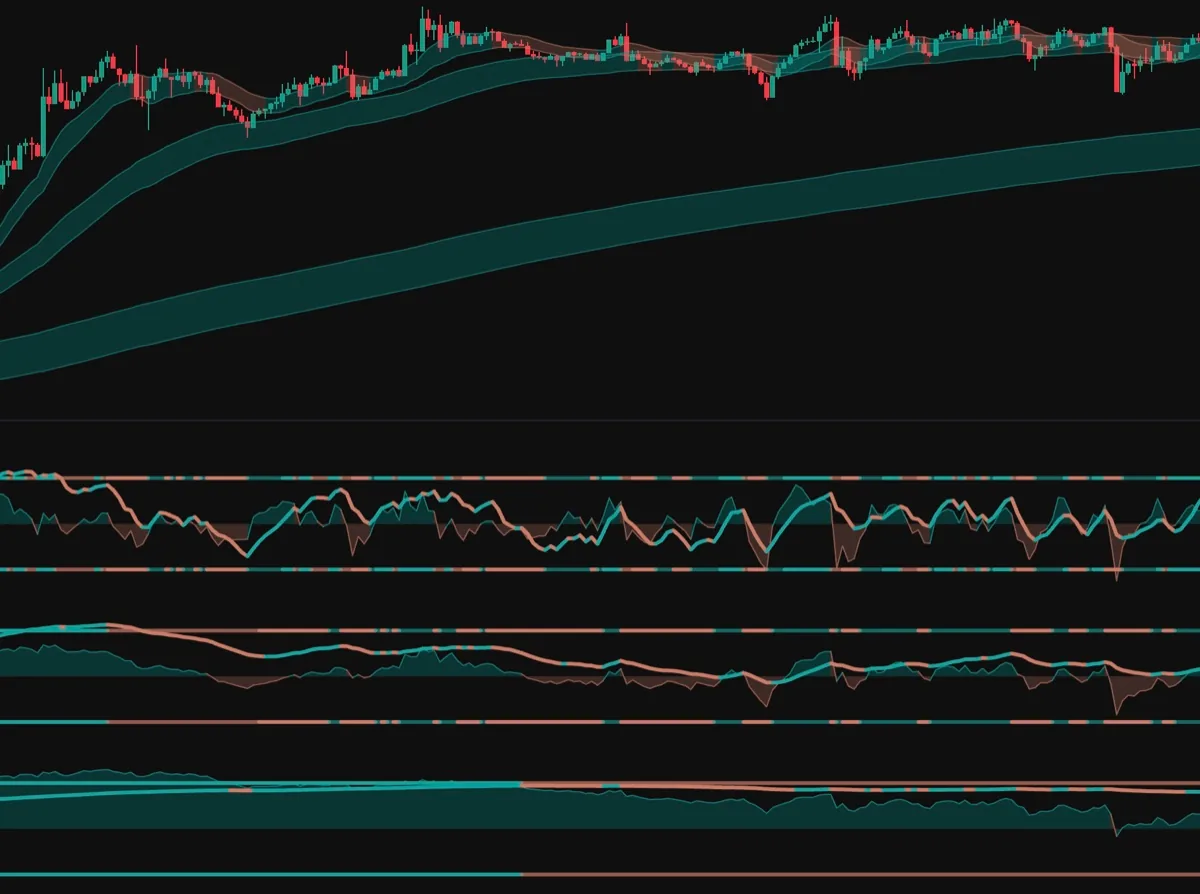
The chart in front of you is never just one trend. It's three at once: the quick wobble of the timeframe you're on (the ripple), a broader swing a few steps up (the wave), and the dominant current beneath both (the tide). They're spaced to land on the two higher timeframes you'd glance at anyway. On a 1-hour chart, the wave tracks the 4-hour and the tide tracks the daily (roughly ~4× and ~24× your timeframe). Many tools pull those higher timeframes and make you wait for each candle to close. Trade Symbiotic doesn't: it rebuilds the wave and tide from your own chart, recomputed on every bar, so you watch the higher-timeframe trend take shape in real time instead of waiting for it to print. Wave and Tide are rebuilt from a rolling window of your own bars, so they are a live approximation of those higher timeframes, not a copy of the higher-timeframe chart. That is what lets you watch them form; it also means they will not match a 4-hour chart tick for tick. The same momentum read runs at all three scales and stacks them in one view: teal when a scale is rising, coral when it's falling.
When all three line up, all three scales are reading the same direction. When they don't line up, that's information too, not noise to wait out. A fast scale fading while the higher ones still rise is a split reading: the Ripple has turned down, the Wave and Tide have not, and the indicator draws it exactly that way. All three drifting flat is a flat reading at every scale. All three stretched into overbought or oversold together means every tier sits at the edge of its recent range, which describes where price has been and nothing about where it goes next. Trade Symbiotic doesn't predict price; it maps which of these configurations you're in and leaves the decision to you. Every read is confirmed on the candle's close and never revised after, so it doesn't repaint: closed bars on your chart are fixed, so past readings stay put, and only the live, still-forming bar updates, exactly as any honest real-time tool should.
Whether a higher-timeframe read can be trusted at all comes down to one testable property, and it takes about ten minutes to check on any indicator, ours included: does my TradingView indicator repaint. The honest limit of that test is narrow. It settles whether past values move, and says nothing about whether the read is worth having.
Price structure and momentum, in one tool.
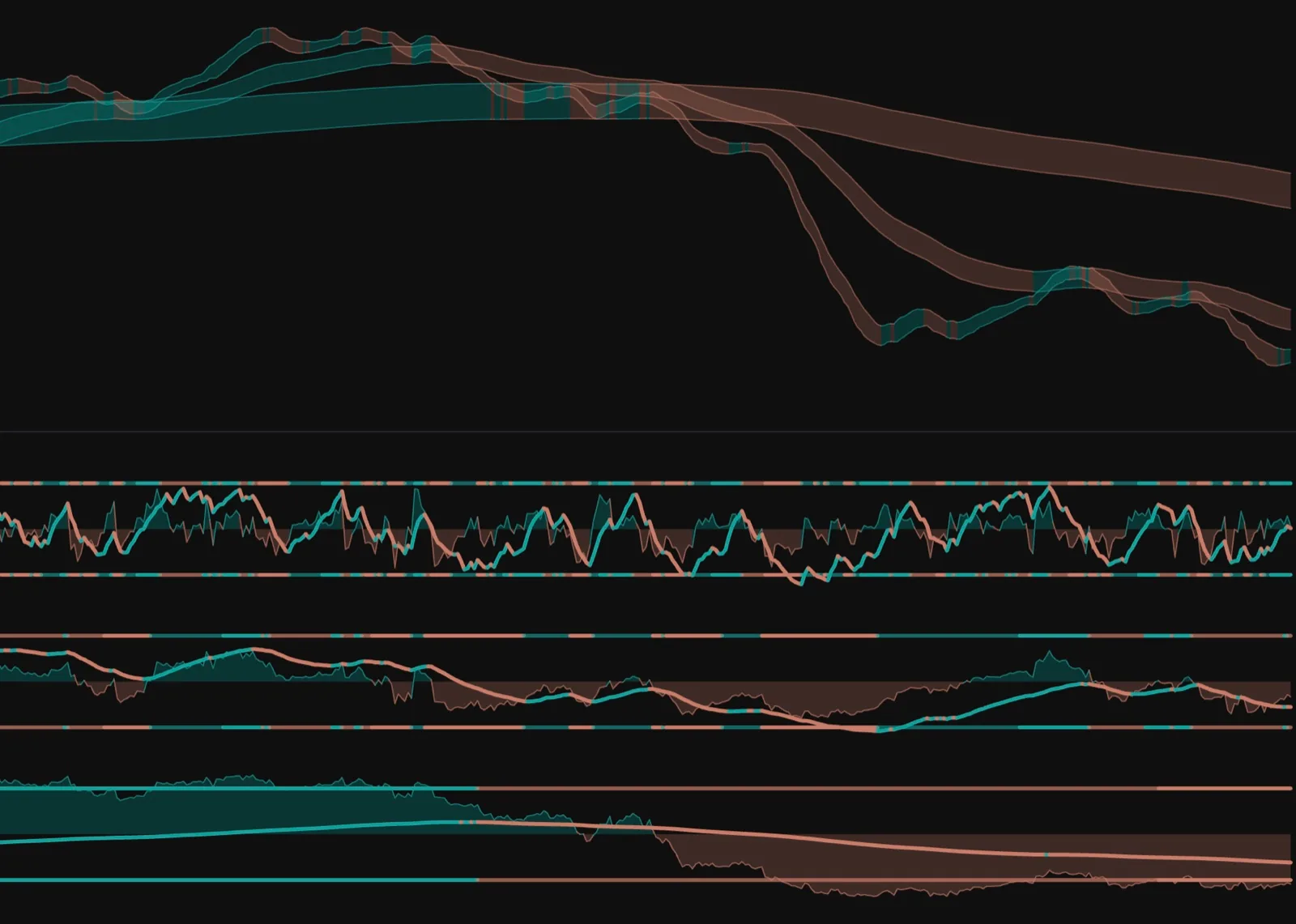
Most traders run an overlay (something drawn on the candles) and a separate oscillator below, usually from two different indicators that don't talk to each other. Trade Symbiotic is both, from one engine: adaptive bands on your price for structure and trend, plus a momentum oscillator beneath it, always reading the same market the same way.
One indicator does the job of several, and the two halves never contradict each other.
"Isn't that just more stuff cluttering my chart?"
It's the opposite. It replaces a trend overlay plus a separate momentum oscillator, usually two indicators that don't talk to each other, with one engine reading the same data. Less on the chart, no mixed signals, faster reads.
It tunes itself to whatever chart you open.
Switch from a 5-minute chart to the daily and an indicator tuned for one timeframe stops making sense, because its lookbacks were chosen for bars of a different length. Trade Symbiotic reads your chart's timeframe and re-tunes its Wave and Tide multipliers automatically. A built-in table picks sensible multiples for each chart (your Ripple is always ×1), so the higher tiers always land on timeframes worth watching from wherever you are.
Nothing to set, nothing to re-optimise. Open any chart and it's already calibrated. Your chart is the Ripple (always ×1); Wave and Tide are multiples of it, and auto-detect picks the right multiples per chart from a built-in table: Wave ×6 / Tide ×24 on a 5-minute, Wave ×4 / Tide ×24 on the 1-hour, Wave ×6 / Tide ×42 on the 4-hour, Wave ×7 / Tide ×30 on the daily. Different chart, different multiples, but always two higher tiers worth watching. The same multiples drive both the oscillator tiers and the overlay on your price, so the whole indicator stays in step. Turn auto-detect off and you set the multipliers yourself.
"Every indicator works great, until I change the timeframe."
That's exactly what this fixes. Because the tiers scale to your chart, it behaves consistently on the 1-minute and the 1-month alike. It adapts to the chart, so you don't adapt to it.
Prefer to drive it yourself? You can override the multipliers, but you almost never need to. The same auto-tuned multiples drive both the oscillator tiers and the overlay on your price, so the whole indicator stays in step on any chart.
7 entry slots · 7 exit slots · AND / OR / 2-of-3 · plus a NOT on any condition.
Start with a preset. Bend it to your strategy.
Six ready-made presets load in one click. From there, the builder is yours. You get 14 slots (seven entry, seven exit), each combining up to three conditions with AND, OR or 2-of-3 logic, plus a NOT on any single condition for "fire unless…" filters. Every condition is a dropdown.
One TradingView alert covers your whole entry side, one covers your exit side. Re-tune the slots anytime, and the same alert reflects it.
That single alert is the point. TradingView's alert dialog attaches to one indicator, so it will not let you require two separate scripts to agree, and the compound condition has to live inside one of them. The four ways round that, with and without Pine, are set out in how to combine indicators into one TradingView alert. The limit is TradingView's, not ours.
"Canned alerts never match how I actually trade, and building custom means learning Pine."
Neither here. The presets are just a starting point, and the custom builder is pure dropdowns, so you never open the Pine editor. It fires on your exact setup, not someone else's idea of one.
Only get alerted when you're actually trading.
An optional session filter gates every alert to a window you choose, in your timezone. Trade the London open? The New York session? Only your own hours? Set it once, and the indicator stays silent outside it.
The setup still works around the clock. You just don't get pinged for signals you'd never take.
The honest cost: alerts fire from TradingView's servers, so they can be delayed, duplicated, or missed. Trade Symbiotic is not an execution system, and no alert should be the only thing standing between you and an order.
"I don't want a 3am buzz for a move in a session I don't trade."
Then switch on the session filter and set your hours. Outside them, nothing fires: no noise, no dead-hours alerts, no muting your phone.
Build your alert, watch it, then transplant it.
The on-site Sandbox is a full builder for the alert system, free, no account required. Assemble any setup, watch it light up, and copy a single share code. Paste that code into the indicator's Sandbox field and it configures all 14 slots in one go.
It's the fastest way to move a setup from idea to chart, and a way to design your logic before you ever install anything. (The Sandbox runs on illustrative data, so it's for shaping the alert logic, not a live backtest. Judge the signals themselves on a real chart once you have access.)
"I'm not buying an indicator I can't even try, and I don't trust black boxes."
So build and see your exact alert in the browser first, no purchase needed, then carry it across with one code. Nothing hidden, nothing to take on faith.
Make it match your chart, and your style.
Two colour pickers at the top of the settings recolour the entire indicator (bands and oscillators) to whatever palette you trade in. Show or hide any tier you don't use. Set your own overbought / oversold levels for the level-based alerts. Choose the logic on every slot.
It bends to you, not the other way around, without ever touching code.
"It won't match my chart theme or the way I read a setup."
Recolour everything to your theme, hide the tiers you don't watch, and set the levels you care about. It adapts to your chart, so it feels like part of your setup, not bolted on.
A dozen tools can disagree with each other. One engine cannot.
Each script in a suite defines trend, momentum and smoothing its own way, so when two of them contradict each other you are left arbitrating between definitions you didn't write. That isn't confluence, it's a committee. Everything on this page comes from one engine reading the same data: the bands on your price, the three momentum tiers beneath them and every condition in the alert builder share one definition of trend and one of momentum, and they occupy one indicator slot where two scripts would cost you two. TradingView caps how many indicators you can run per chart on the lower plans, so that is a real constraint rather than a tidiness argument, and the cap is theirs, not ours.
The honest counter: a bundle of a dozen scripts contains things this does not attempt at all. No volume profile, no order flow, no automatic market-structure drawing. If those are what you're shopping for, one engine is not a substitute for a suite, and no amount of internal consistency makes it one.
"Twelve scripts for the price of one has to be better value."
Count what you'd actually run. If it's a trend overlay and a momentum oscillator, that's two slots and two definitions of the same market. If it's a volume profile, this isn't the tool. Nobody can answer that for you from a pricing page.
Related reading: your options for multi-timeframe context, the paid names, the no-cost routes and what each one charges.
Build a setup in the no-account Sandbox, or jump in. Every plan is backed by a 7-day money-back guarantee: not for you, email us within 7 days and we refund it, no questions asked.
Decide what we may use. Strictly necessary cookies keep the site working and can't be switched off. Read our cookie policy
Security, your saved preferences, and remembering this very choice. No tracking, ever.
Privacy-friendly, aggregated usage stats so we can improve the experience. Off by default.
Measuring campaigns and tailoring offers. Off by default.